You know your office suite is bloated when..

Posted by Andrew Z at Tuesday, June 23, 2009 | Permalink


-

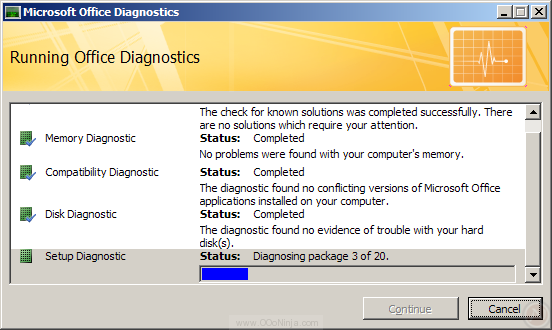
You know your office suite is bloated and too complex when the help menu prominently features an "Office Diagnostic" feature covering memory, disk, setup, compatibility, and "known solutions."

Well, Microsoft Office Outlook 2007 includes Office Diagnostics. The "known solutions" makes sense: Office crashes, it records a signature of the crash, submits it to programmers, and looks for updates. However, why check memory and the disk? In an office suite? Sure, hardware fails, but doesn't checking hardware belong in the operating system and not in an application? Besides, when was the last time you using Firefox or OpenOffice.org, it crashed, and later you found out it was the memory or the disk's fault?

Microsoft Office Diagnostics in Outlook 2007

What's worse is this diagnostic took at least 20 minutes to finish on a nice dual-core with 2GB RAM.

Microsoft Office Diagnostics in Outlook 2007

OpenOffice.org isn't necessarily have a reptutation for being lean itself, but developers are pushing hard to make OpenOffice.org 3.2 the fastest version yet. Stay tuned for more.

Related articles

Orientation for New OpenOffice.org Users

Posted by Andrew Z at Monday, June 1, 2009 | Permalink


-

Know anyone new to the OpenOffice.org community needing a guide to r support, tutorials, community insights, templates, clip art, extensions, and blogs? Read my newest article "OpenOffice.org New User Orientation" on WorldLabel.com's blog.

Microsoft support for OpenDocument (ODF)

Posted by Andrew Z at Monday, May 4, 2009 | Permalink


-

Recently released, Microsoft Office 2007 Service Pack 2 supports OpenDocument Format version 1.1. With Microsoft's tarnished history of abusing standards for profit and obvious preference for Microsoft's own Office Open XML, what could Microsoft's ODF support possibility look like?

Office 2007 SP2 supports ODF is supported out of the box. There's nothing to add on or enable: It Just Works(tm). OpenDocument is listed among other formats in the File and Save dialogs. Remarkably Excel and PowerPoint list OpenDocument last. The order is neither alphabetical (XPS comes before OpenDocument) nor not in terms of conversion fidelity (because CSV also comes first).

To evaluate the quality, I opened the reference document ODF_text_reference_v3.odt in Word 2007. Overall the conversion was respectable for what is essentially a version 1.0 release for Microsoft Office. The bugs I noticed were:

  • Tracked changes were missing.
  • The second level of an ordered list was indented like first level (that is, it was not intended correctly).
  • An inline image was out of place.
  • One active hyperlink was neither blue nor underlined (though another hyperlink is fine).
  • All form controls were missing.
  • Not exactly a format bug, but Word 2007 considers "OpenDocument" misspelled though "WordPerfect" is recognized.

I also tested saved simple spreadsheet functions in OpenOffice.org 3.1 (release candidate 1) and opened it in Excel. A chart converted nicely, but Excel silently converted all the functions to their last values. That's often fine for viewing but worthless for collaboration. Microsoft seems to be waiting for OpenFormula (ODFF) standard to be finished, but Rob Weir points out that some Microsoft Office customers were already saving spreadsheet formula in ODF using the OpenXML/ODF Translator Add-in for Office, a project involving Microsoft.

Undoubtedly there are more bugs and quirks that will show up in certain types of documents. For example, Ivan N. Zlatev noticed a few. Generally I expect simple ODF word processor documents will transfer easily, but large business document will suffer.

To be fair, any large software program has bugs, and Office 2007 SP2 is Microsoft's first take on ODF in Office. Furthermore, not all differences are bugs, and Microsoft gets bonus points for documenting implementation details. For example, ODF allows for larger page sizes, but Word 2007 imposes a limit of 22x22 inches on all document formats.

Even ODF poster child OpenOffice.org has bugs in the ODF implementation. My favorite is 64237: until version 3.0, OpenOffice.org implemented the paragraph hidden property backwards.

Microsoft has opened the ODF door and will be pressured on better interoperability, so even my inner cynic has a hard time imagining interoperability will not improve. With Office 2007 SP2 and Wordpad in Windows 7 supporting ODF, the future looks bright for OpenDocument Format. Has Microsoft turned a new leaf? Microsoft's recent investments in ODF, PDF, and web standards (in Internet Explorer 8) are probably more a function of government regulation or business demand than corporate goodwill. Backed into a corner or otherwise, Microsoft has done the right thing, but further work is necessary before the general public can use ODF transparently in Office.

Microsoft has surrendered on web standards and office document formats, and they will focus the battle elsewhere. By the time Evolution and Thunderbird gain traction as competitors to Outlook, Microsoft will have business users addicted to more complex technologies such as Sharepoint and software as a service (SaaS).