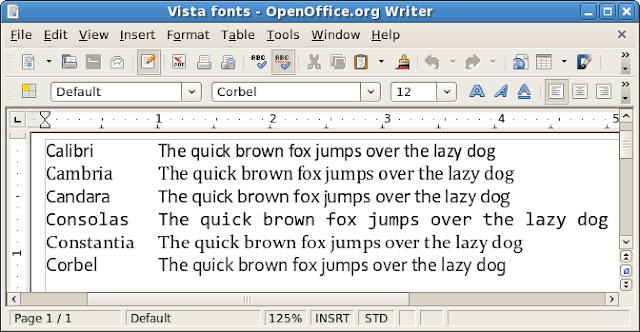
Windows Vista and Microsoft Office 2007 introduced the new ClearType Collection typefaces: Calibri, Cambria, Candara, Consolas, Constantia, and Corbel. These fonts replace the classics Times New Roman, Arial, Courier New, etc. When passing documents between systems, it's necessary to have the same fonts installed; otherwise, document appearance and layout may suffer. If you receive an Office Open XML .docx or .pptx file, chances are you need these new fonts, but OpenOffice.org, Linux, and Windows XP users need not be left out in the cold. Until Red Hat creates new metrically equivalent fonts (as it did for the older Microsoft fonts), it's easy to install these new Microsoft fonts without Vista or Office.
License
Please read the PowerPoint Viewer download page, which includes this statement:
You may use the fonts that accompany the PowerPoint Viewer only to display and print content from a device running a Microsoft Windows operating system.
I am not a lawyer, but I wonder whether having Windows in dual boot or virtualization satisfies this requirement. If you want a free-as-in-speech alternative, use font replacement.
Method 1: Windows Only
Simply download and install PowerPoint Viewer 2007. Alternatively, you could use the Microsoft Office Compatibility Pack, but it's a much larger download. Both downloads are free and neither requires Windows Genuine Advantage validation.
Method 2: cabextract (Linux only)
- Install cabextract. On Fedora, simply run this command:
sudo yum -y install cabextractOn Ubuntu, run:sudo apt-get install cabextract - Download PowerPoint Viewer 2007.
- Extract the .exe:
cabextract -F ppviewer.cab PowerPointViewer.exe - Prepare a separate target installation directory:
sudo mkdir /usr/share/fonts/vista - Extract the actual fonts:
sudo cabextract -F '*.TT?' -d /usr/share/fonts/vista ppviewer.cab
Tip: You may substitute ~/.fonts instead of /usr/share/fonts for a local, single-user installation that does not require root access. - Update the cache:
fc-cache -fv
Method 3: Wine (Linux only)
- Install Wine. On Fedora, simply run:
sudo yum -y install wineOn Ubuntu, run:sudo apt-get install wine - Download PowerPoint Viewer 2007.
- Install the viewer by running:
wine PowerPointViewer.exe - Install the fonts by moving them like so:
sudo mkdir /usr/share/fonts/vista
cd ~/.wine/drive_c/windows/fonts/
sudo mv {CALIBR,CAMBRIA,CANDARA,CONSOLA,CONSTAN,CORBEL}*.TT? \
 /usr/share/fonts/vista
Tip: You may substitute ~/.fonts instead of /usr/share/fonts for a local, single-user installation that does not require root access. - Update the cache:
fc-cache -fv
Testing and Comparison
Once the fonts are installed, refresh this page. Exiting the browser first may be necessary. Then, you should see the fonts change below.
Did you know that OpenOffice.org installs the Bitstream fonts?
| Windows Vista / Office 2007 | Windows 95–XP Era | OpenOffice.org |
|---|---|---|
| Calibri | Arial
Arial Black |
Bitstream Vera Sans |
| Cambria | Times New Roman
Georgia Impact |
Bitstream Vera Serif |
| Candara | Trebuchet MS | |
| Consolas | Lucida Console
Courier New |
Bitstream Vera Mono |
| Constantia | Book Antiqua
Palatino Linotype Tahoma |
|
| Corbel | Verdana |
Font Replacement
This section has been moved and expanded to Metrical Equivalent Fonts and Font Substitution.
Comments
If it's not my boss or a client sending the document, I would almost prefer to have them recompose the document using one of the older fonts... or print it as a PDF if they must.
Arial -> FreeSans, Liberation Sans, Caslon Roman, URW Helvetica or Nimbus Sans
Times New Roman -> FreeSerif, Liberation Serif, Linux Libertine or Nimbus Roman (or Gentium if you want something a little more Garamondesque)
Georgia -> Bitstream Vera Serif or DejaVu Serif
Trebuchet MS -> Lucida Sans
Lucida Console -> Bitstream Vera Sans Mono, DejaVu Sans Mono, Liberation Mono, Lucida Sans Typewriter
Courier New -> FreeMono, URW Courier
Book Antiqua/Palatino -> URW Palladio/Palatino
Tahoma -> DejaVu Sans Condensed or Toga Sans
Verdana -> Bitstream Vera Sans or DejaVu Sans
So there's really no need to be downloading pirated Vista fonts. I don't think the absence of common fonts is really an issue for free software anymore, just the lack of proprietary font names.
Ascender Corp is the official licensee of Microsoft's fonts for folks who want any of the new Vista & Office fonts, or any of their older fonts.
Legitimate versions of the 95 through XP fonts may also be obtained from corefonts.sourceforge.net, due to Microsoft going through a phase of wanting everyone to use their fonts on the web back in 1998 or so, and making the license more liberal than current offerings.
At the time of the Core Fonts release, some people warned against using the Microsoft fonts because eventually Microsoft would make the license more restrictive once they got popular, and sure enough, they did. If you doubt what the anonymous poster up above was saying about Microsoft's fonts benefiting them more than you when you use them.... that would be a pretty good example.
$ cabextract -F '*.TTC' ppviewer.cab
$ mv CAMBRIA.TTC CAMBRIA.TTF
Otherwise you will have bold, italic, and bold italic, but no regular.
Anonymous1, Anonymous3: Sorry. The link to a tarball with these files likely violates the license, so I must delete the comment.
Anonymous2, Raindog469: Thanks for the insights!
Andrew
BTW I once bought MS-fonts, for about $7,- you must only wait a bit and someone wants to sell such an official package for very little.
But if MS is the defacto standard then what is produced by MS should be readable for everyone!
I don't think they did. Do you have a reference? The MS Web fonts EULA made adding extra restrictions impossible.
Ascender also made the Android fonts for Google - which will go OS. Thanks Ascender!
Did the previous commands succeed? Is /usr/share/fonts a directory? Which Linux do you use? Perhaps your system-wide fonts folder is not /usr/share/fonts? If so, you can either find the system-wide folder or substitute ~/.fonts for a user-level installation.
Andrew
I only have words of appreciation for your work. So, thanks for the content you provide.
You have a great blog. Thank you.
Tuxero
What I care about are my eyes and the headache after about an hour on Linux. I love linux and use it over everything else... The fonts,, just aren't up to par...
Since installed fonts like this..
My screen is MUCH easier on the eyes. I don't have to strain to read and I can spend more time programming and not taking ibuprofen
Thank you for this tutorial.
any ideas?
thank u so much for theses tips,
i ve a question please: can i find with theses fonts: ""MS Reference Serif;Palatino Linotype"" and ""Wingdings 3""
i ve many documents with specials characters writing under windows, which i was able to read with microsoft office word.. but now i m using ubuntu and i can't read them
thanks in advance
Laennec
http://kennethreitz.com/office-2007-in-linux/
...
You may use the fonts that accompany the PowerPoint Viewer only to display and print content from a device running a Microsoft Windows operating system.
This sounds like the OS of origin is the key.
In other words, this is another excellent reason (in addition to monopoly concerns) not to distribute a document using these fonts if you are not running Microsoft OS. No problem using it to read documents.
It's absolutely ugly with jaggies all over the place (openoffice & this site).
I don't understand because the calibri font is definitely there and the cache is updated..
In Linux (Fedora 12), will the Vista fonts be available in OpenOffice ? I have installed them to /usr/share/fonts/Vista.
Best regards,
Dr Dennis AFP
Manager, Webmaster and User
FREE Online Ads
http://i25.tinypic.com/sxiwls.jpg
Then you need to extract TTF and TTC files from O12Conv.cab (it's an uppercase o).
this is santosh Kumar from Hyderabad and i want to know how to install MS office fonts for open office
Seems to me that the font equivalents in Libre render it unnecessary to go looking for Windows fonts, it's just a matter of learning which are the Libre equivalents.
- download the MS installer
- install it to a virtual device of your choice following the wizard in PlayOnLinux (I named it microsoft_download)
- switch to a terminal, find the installed *.TTF files somewhere below ~/.PlayOnLinux/wineprefix/microsoft_download/drive_c/windows/Fonts/*.TTF
- become root user or use sudo for the following
- copy the TTF files to
/usr/share/fonts/vista (the exact directory name doesn't seem to matter)
- call fc-cache -fv
- restart LibreOffice (or OpenOffice) :-)
PowerPoint Viewer was retired on April 30, 2018. It's no longer available for download.
https://download.cnet.com/PowerPoint-Viewer-2007/3000-18483_4-10742145.html