OpenOffice.org 3.0 is 167 days away, but who's counting? Maybe the software developers are counting because they have a whopping 2,278 issues targeted for this release. Even though OpenOffice.org 2.4 is not yet out the door, let's see how far they've come with OpenOffice.org 3.0.
The redesigned splash screen and about dialog:
Please keep in mind this article is based off an alpha release, so many things will change before the final release.
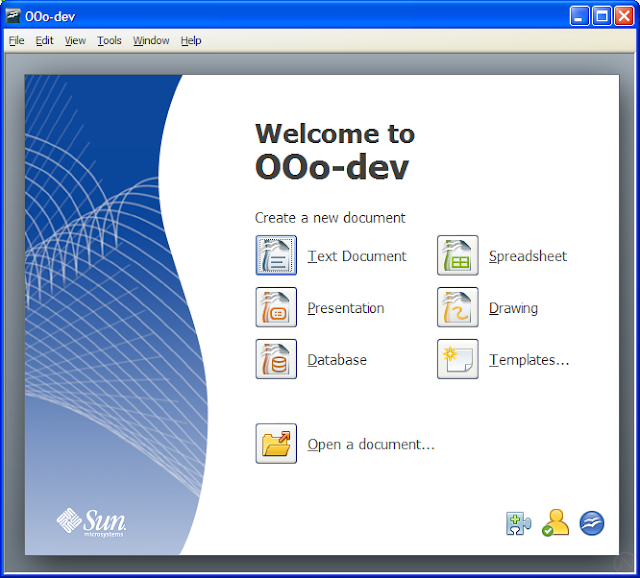
Start center
When OpenOffice.org 3 starts without a document and without a module (such as Writer), it presents the new Start Center.
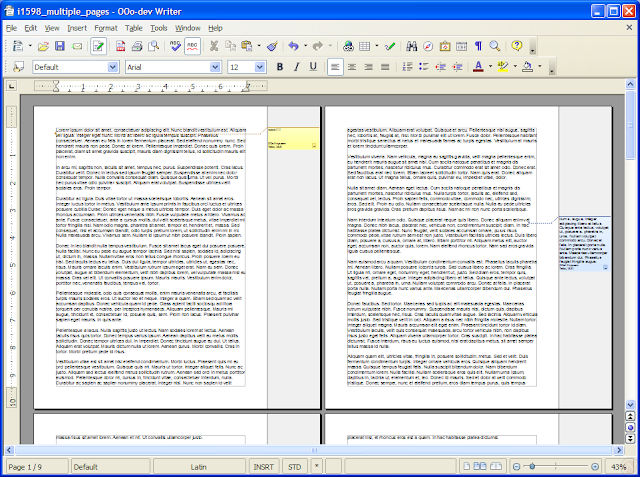
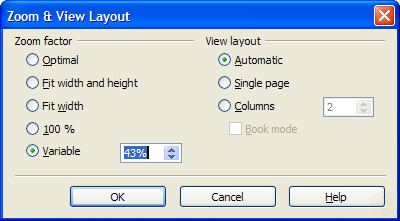
View multiple pages in Writer
One of the most ever voted issues is viewing multiple pages in writer. Notice the two new controls in the statusbar (bottom-right-hand corner) of the first screenshot: the "View Layout" mode selection and the zoom slider. The "View Layout" control switches between a single page, several pages side by side, and book layout.

Pretty notes in the margin
The much anticipated improvement called Notes2 is nearly ready. It will refresh the look, introduce rich formatting and spell checking, aid accessibility, and boost usability while displaying notes in the margin.
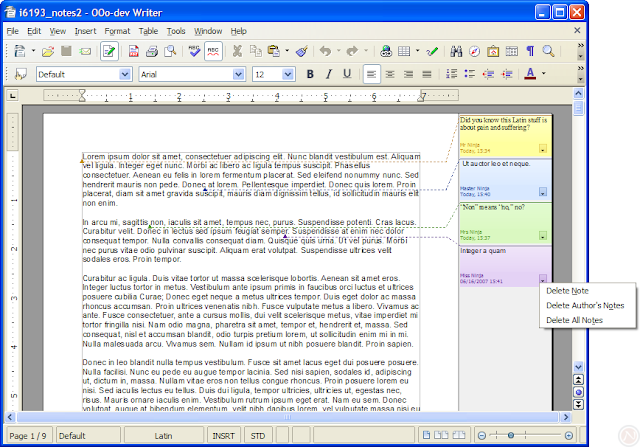
The current DEV300_m3 alpha release only supports marking a single point with a note; a later version will allow marking a selection of text with a note. However, 3.0 will not track changes in the margin.
Microsoft Office 2007 file format support
Microsoft Office 2007 (also called Office Open XML) file formats include .docx, .pptx, and .xlsx. Despite the similarity in names, these formats are significantly different than the Microsoft Office formats used since 1997. OpenOffice.org 3 offers native import.
OpenOffice.org 3.0 DEV300_m3 converted this reference .docx document with mediocre quality. The notable problems were tracked changes, a comment, columns, an image, and an embedded Excel document. For comparison, the same document is shown rendered in Word 2007 and in OpenOffice.org 3.0 DEV300_m3.
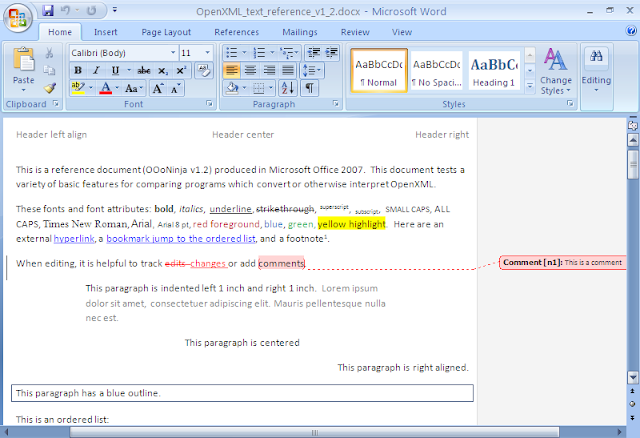
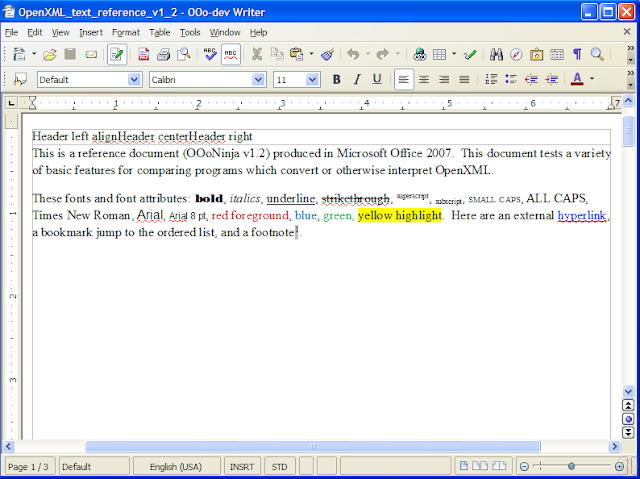
Surely the quality of conversion will improve before September's final release.
Tip: To access .docx, .xlsx, and .pptx files in OpenOffice.org 2.4, see previous Office 2007 file format articles and odf-converter-integrator.
Solver in Calc
It's the perfect solution for your linear optimization needs. The feature announcement explains:
Calc now has a linear optimization solver. It finds a set of input values that maximize or minimize an objective function, while satisfying a set of constraints.
A linear programming model is defined by formulas in spreadsheet cells, the objective and constraints are specified in a dialog. Input variables can be defined to be integer or binary (mixed integer linear programming).

Need a solver now? See Kohei's solver.
New theme in Calc
Calc 3.0 paints selections with translucence and renders column and row headers with a glass effect. Version 2.4 is shown first for comparison.


Native tables in Impress
Impress 3.0 has native tables. The new Table Design panel (shown on the right) makes it easy to apply colors.

Error bars in charts
Don't make any mistakes about it: OpenOffice.org is serious about improving charts for scientific uses. OpenOffice.org 3.0 has error bars in charts.


OpenOffice.org 2.4 also made progress in charts:
More columns in Calc
Calc 3.0 extends the maximum columns from 256 to 1024.

More
Wait, that's not all! Download now and you'll also get:
- Official support for Mac—using the pretty Aqua interface
- Performance improvements
- Simultaneous editing of spreadsheets by multiple users
- Cross-references to headings
- Updates to embedded fields in mail merges from Calc
- Displaying PostScript OpenType fonts on Linux and Solaris
- Titles for secondary axes in charts
- OpenDocument Format 1.2
- ...and much more! Issue Tracker: Issues marked fixed for 3.0 (number of issues will increase as September approaches)
What's missing
With months left to go, there's several pieces still missing.
- Importing standard PDF files
- Hybrid PDFs: fully editable PDFs with embedded OpenDocument files (issue 65397)
- Presenter view in Impres
- Dictionaries as extensions (to replace DicOOo)
- Macros in Base documents
- Bug testing
A year ago in OOoCon 2007's keynote address, Louis Suárez-Potts, Community Manager of OpenOffice.org, touched on many ideas for OpenOffice.org 3.0. Many are already fulfilled ahead of schedule in 2.4 or earlier: rectangular selection, wiki export, new chart module, and the Pentaho report engine.
However, one feature you may not see this year is an Outlook replacement. For years, there have been talks of including Mozilla's Thunderbird and Lightning (calendar) application with OpenOffice.org. However, not much as come of it yet. Perhaps with the financial resources of the new Mozilla Messaging Corporation, the Mozilla Calendar will get the boost it needs.
Conclusion
OpenOffice.org 3.0 will be an excellent release. To make it better, please see Top 12 reasons to test the OpenOffice.org 2.4 release candidate for a guide to testing any version of OpenOffice.org.
OpenOffice.org 3.0 downloads (marked DEV300 or BEA300, not OOH) are available from:
Developer snapshotsOpenOffice.org mirrors in the developer/DEV300_* subdirectoryPavel Janik's siteMac OS X port download page with Intel and PowerPC
64-bit Linux versions are not yet available. Caution: this is an alpha build and is not intended for everyday use. It may cause problems, so use it only for testing purposes.
UPDATED: Download the latest, stable release.
Related articles
- OpenOffice.org 3.0 beta?
- Galaxy icon set in OpenOffice.org 3.0
- Desktop start icon in OpenOffice.org 3.0
- Interactive picture crop in Draw and Impress in OpenOffice.org 3.0
- PDF import and hybrid PDFs as a new extension for OpenOffice.org 3.0
- New features in OpenOffice.org 2.4
- New Features in OpenOffice.org 3.1, an Early Look
Comments
There are only a few things keeping me in the M$ software suite:
1. Compatibility -- you must have 99.9% compatibility in a business setting. Nobody likes not being able to see the columns on a formatted word document. Alas, word is still the de facto standard. If a true open format emerges (.ods?) I would switch in a heartbeat.
2. A few features -- e.g. datapilot (pivot tables) is simply not as good as Word's.
3. Speed - OOwriter startup speed is abysmal, even with prefetching on Linux. This must be improved.
I really look forward to the next release! Keep going, Sun!
It's not so great on slower machines with not a whole lot of RAM, if you wanted to speed it up you can follow these instructions:
http://tuxtraining.com/2008/03/04/speed-up-start-time-for-openofficeorg/
As far as compatibility is concerned who says de facto is Microsoft? They wouldn't know de facto if it grew pricks and they sat on it! They change the standards with every release (especially now with this docx crap). Ask any IT support guy how many times he's advised someone to resend the attachment as a .doc or a .rtf as the receiver can't read it.
Why keep up with MS standards - make THEM keep up with OPEN standards - if OpenOffice contributors didn't have to spend so much time assuring MS compatibility to try and get their product in the mainstream then it would be one hell of a lot better than it is now.
Nuff said - I'll get my coat.
Cheers,
http://www.unofficialmac.com
http://www.pspport.com
In word, you connect directly to an address book and pull full addresses out in one go.
In Open Office, you get some incomprehensible, field by field access to a data base you are supposed to design and then link to.
Word = Writer
Xcel = Calc
Power Point = Presenter
Access = Base
Outlook = Not available
Visio = Not available
Project = Not available
OneNote = Not available
Infopath = Not available
Groove = Not available
Picture Manager = Not available
Frontpage ... ok I'm not counting that one...
OOO is not even half of a suite! It seems to me that the development is very slow. There are basically no new features sing half a decade! MS is running circles around you. An then there is the performance of OOO. Lets not even go there; Microsoft's has 10x the features and stil opertes and starts faster.
What I notice with open source advocates is that they start implementing features without considering all reasons why people use what seems as bad software.
Base lacks the support of VB code running behind access.
This really puts a clamp down on how creative you can be in base - this needs to be addressed.
And not to be nit picky, but hire a decent graphic artist to update the Windows 3.1 icons.... =\
1. Book layout features in Writer, including better kerning, paragraph-level letter spacing and hyphenation, microtypography, and automatic ligatures. I know that a lot of open-source people will say, "Use TeX." But why is this still necessary in 2008? TeX isn't particularly easy to install, doesn't support system (TrueType/OpenType) fonts without special packages like Xetex, and isn't WYSIWYG. With the growth of on-demand book publishing, there has to be an easier way to produce high-quality layouts.
2. Better native integration with content management systems and blogs (including support for Blogger, WordPress, ATOM, and MetaWeblog APIs). Writer requires the $10 Sun Weblog Publisher extension. Word 2007 has a built-in direct-to-blog publishing capability, so why not Writer?
3. Support for synchronized audio in Impress.
4. Built-in Adobe Presenter-like Flash export for Impress (self running presentations, hopefully with the option of continuous talking-head presenter videos, which both Adobe Presenter and Articulate Presenter currently lack).
thanks all for a great piece of software!
I only would like to point a couple of things it would be great for you to improve/include:
Preview option: I've been using Draw a LOT and it would be really useful to include a Preview button on the dialog screens so you can see how the changes reflect in the actual drawing (also applies to Impress).
Calc's Better Feel: Is still difficult to drag and drop cells and selections on Calc, it could be greatly improved.
thanks again for the great software, I've been caimpaigning to get it used among all my coworkers and friends (and getting themto switch to linux while they're at it :P)
Grrr...
That's mostly worthy of giving it 1.0a instead of 3.0.
Style templates and autogen of tables
Just put in
Style templates and autogen of tables
and I'll use it.
The only thing that keeps me on Word is
Style templates and autogen of tables
and the only thing that makes my boss insist on Word is
Style templates and autogen of tables
and the only thing that keeps my colleagues on Word is
Style templates and autogen of tables
and there number one complaint is that Openoffice doesn't have
Style templates and autogen of tables
How hard is it to get this right people? Come on. For the love of God... do I need to code it myself?
Also smaller items like remembering the last setting to sort with the first row being column labels.
Matrix notation is notably more readable when one has to inspect complex formulas.
The option to choose preferred notation for cells is a must - the reason why I some wouldn't switch from Excel.
I think that is a way cool feature.
Instead of Visio, try Dia.
Instead of Outlook, try Thunderbird.
Instead of Project, try Open Workbench.
Picture Manager, there are hundreds but Picasa is worth a try.
Frontpage has a better competitor in NVU - unless you want messy HTML that caters only to IE.
I love Open Office and prefer it to MS Office (especially since 2007). Keep up the great work!
PPC Aqua 3.0 here
http://ooopackages.good-day.net/pub/OpenOffice.org/MacOSX/DEV300_m2/
This is sooooo important to so many people, I can't understand why the developers work so hard on hundreds of other features, and ignore outlining.
It's like building the most beautiful house in the world, with every imaginable feature, except, by the way, there's no bathrooms.
I work translating documents and this is about the only thing that keeps me tied to microsoft office.
i thought they were targetting Office 2007
not Office 2003... :(
when will the interface look more modern?
Pivot tables: you use them in Word? Sicko!
Speed: startup is being improved.
Appearance: I really like Tango. Also, using themes in Windows or KDE or GNOME or Aqua vastly improves things.
Writer: 'normal view', can be closely matched with 'optimal' zoom setting. As far as formatting goes, NV in Word had me scratching my head a few times.
Envelope addressing: What do you mean by that? You can create any paper format you want (prerecorded envelope size for direct envelope printing), or use the wizard for positioned address block generation (a few clicks) or use the dedicated stickers template for stickers generation.
Visio: see Draw (actually, with its3D modeling capabilities, Draw kicks Visio's butt); Infopath: Writer supports Xforms natively...; OneNote: eugh! Others: it's a productivity suite, not a kitchen... Outlook: use Evolution or Thunderbird+Sunbird (integration with OOo on the way)
Style templates: go to File > Document models > Manage... and add your custom style templates (styles cover every and all aspects of a document; create your own, set as default, done!)
Table autogen: what's that? An auto incremented key in Base, or simply getting cut'n'paste abilities of tables? NEwsflash, you copy your external table in Calc, then copy and paste the result in Writer: here, you got a table.
Content generation: OOo already does mediaWiki and XHTML. You want more, write the output plugin.
Document outlining, though, that's true...
I want OSS to succeed. But.
Thunderbird is NOT an Outlook replacement for lots of reasons; it does not talk to exchange, and it does not have a calendar, just to mention 2 items... you should know better. I never mentioned a web browser... DIA is a joke compared to Visio. What I did do is show an example of what many office workers do have today, and how OOO compares to it in features. Given that, try to convince them to use OOO. What you need is a compelling reason to switch (so innovate, make it actually better, faster, and more feature rich). Feature wise, OOO is really competing with MS Works. I would like to see that change. Perhaps that is why I am a bit frustrated at the SLOOOOWW development in OOO. Also, as for selling a move to OOO to the corporations; money is not everything, or everyone would take the bus or drive a Yugo. Companies will pay money for something they feel gives them value for the money... so few have selected OOO since, even though it is free, MS still offers more value (delta in features). Few consumers use it since Sun does not pay Dell, HP, etc. for installing it on their consumer products. The result: few people use it. I would like to see that change;because it is in everyones long term best interest; so I hope that the features get added such that perhaps more businesses are open to the idea of switching.
Word = Writer
Xcel = Calc
Power Point = Presenter
Access = Base
Outlook = Ximian/Evolution Thunderbird
Visio = DIA
Project = Workbench
OneNote = Tomboy
Infopath =OpenMRS
Groove = ok... i don't have one..
Picture Manager = Draw; GIMP
Frontpage ... Quanta Plus, Bluefish, NVU,
OOO is not even half of a suite!
There are other products and applications that do the same job. Do they have to be by the same company? Nope.
Well, does that include
It seems to me that the development is very slow.
A new release comes out every 6 months. Office 2003 to Office 12 (2007). That is 4 years. Hmmm. Ok...
There are basically no new features sing half a decade!
You obviously haven't used OO.o. How about exporting PDF's? Soon; the ability to edit PDF's? I could go on; but you get my point. Also; the document formats are open; any program that supports an open format can be used to access the data. You aren't locked into one vendor. Can you say that about MS products? No... I consider that innovative. Sun is confident in their products. Is MS as confident in their products to use
1) An Openformat
2) Make it default
Vendor lock-in says they aren't confident in their products.
MS is running circles around you.
With malware; viruses. But really; how about the office suites... Lets talk. MS hasn't had a decent idea since day one. Almost all of their products have been via acquisition.
MS Word = Xenix systems
IE = Spyglass
Groove = Groove Networks
Shall I go on?
MS outspends companies by acquiring companies. That doesn't mean that are running circles around anyone (out spending, yes). The products speak for themselves. Something like 50-100 million OO.o users. The users are speaking and have spoken.
An then there is the performance of OOO. Lets not even go there; Microsoft's has 10x the features and stil opertes and starts faster.
Well, you obvious haven't see the performance gains that OO.o has made. I have a 1 second start up with OO.o and about a 1 second start up with MS Office. Now here is a performance test MS fails on that OO.o beats hands down. Open a document with tons of images. Every time you scroll up and down Word has to reload the images; not so in Writer. When the document is loaded; it works; that isn't the case with Word. I guess that would be a feature of Word. ;-)
10x the features and 10x the bloat. I guess you haven't heard of the 90/10 rule. Also; how much does your version of Office cost: $399 (retail).
$0 != $399
Issue all your pseudo-complaints you wish; people use OO.o and the number of users is growing. As the user base grows so does: support, features and the (greater) adoption by business. Like it or not; OO.o is hear to stay.
People are making the crazy comparison between this and office 2007 and one person lists all that this has to offer.. but fails to mention that this package costs £500, OpenOffice costs £0.
And someone mentions that people use outlook because of its intergration into Exchange... failing to mention that exchange costs $600 - $3000, so not only have you paid for Outlook, someone else has paid for you to be able to use those features if not your self.
I only ever need to write a document or a spreadsheet everyonce in a while. If someone wants to create a tool as vast as this and let me have it for free then great. If I ever need something like Office, ill use Office.
You're kidding right?
1. MS Works has sucked frn=om day 1 and should only be compared to that word processor that ran on the GEOS OS on a C64.
2. Visio rocks, then again Microsoft didn't build it, they bought it (and yes continued to develop it.) Then again you really need Visio Pro for it to rock, the standard edition is only average.
3. Thunderbird has calendaring via a plugin and recently it really started to work well, but Zimbra is where you need to be going if your talking about the Outlook/Exchange killer. Why do you think MS is trying to buy Yahoo? I guarantee a large part is to squash Zimbra. Having administered both Exchange and Zimbra i'll tell ya Exchange is a piece of shit, and zimbra makes exchange look like it was developed by a bunch of retarded monkeys.
3. You can't compare OO to your entire list as MS Office doesn't include all that you list.
4. Companies very often pay for perceived value, not actual value. Most companies leverage about 10% of the features of the products they have. Most of the "features" you speak of in MS products go unused by the majority of peple because they just arent necessary of are too hard to find when you need it.
Are you one of those retarded monkeys?
You're doing great work!
WE KNOW
the point is, all our companies don't care if it's free.
they'll just use the better product, regardless of price.
Even the unreleased OOo 3.0 is behind the already released Office 2007 in asthetics
no one answered the Qs about GUI.
i thought OOo were going to improve the interface. but it looks identical to me!
I'd imagine major GUI changes would happen with major releases.
in 3.0/4.0 etc..
The new interface in MS Office is stupid and a step backwards, but that's what you get with design by committee. Than and a need to have a "new" way of doing things to put them "that much further ahead" of the competition with something that doesn't really boost productivity, has probably cost the planet tens of millions (if not way more) in retraining costs and time lost.
I can understand incremental improvements, or the option to use a new interface if you wanted, but change for the sake of change when it wasn't broken before is just plain stupid.
All we need and want is a free version of M$ Office - AND THAT'S WHAT OOO IS TO US. Nothing less, nothing more. I don't really see any point of having new features, JUST FIX ALL THE COMPATIBILITY ISSUES!
Anyone running office 2003 can view/edit/create office 2007 formats by simply downloading the free compatibility pack for office 2003, geeze!!! Let's stop being so melodramatic...
- RG>
Sure there are a few features I'd like to see (outlining in writer, advanced data analysis in Calc) - but OO does most of what I need to do. Those missing pieces I figure out a work-around.
Remember, when MSOffice was getting started it took years to get many of the functions that "people just gotta have".
OO will get there. It's fantastic now and will only improve with time.
``It seems that several things have been left out of OOo 3.0 that would make people switch in an instant, such as:
1. Book layout features in Writer, including better kerning, paragraph-level letter spacing and hyphenation, microtypography, and automatic ligatures. I know that a lot of open-source people will say, "Use TeX." But why is this still necessary in 2008? TeX isn't particularly easy to install, doesn't support system (TrueType/OpenType) fonts without special packages like Xetex, and isn't WYSIWYG. With the growth of on-demand book publishing, there has to be an easier way to produce high-quality layouts.
2. Better native integration with content management systems and blogs (including support for Blogger, WordPress, ATOM, and MetaWeblog APIs). Writer requires the $10 Sun Weblog Publisher extension. Word 2007 has a built-in direct-to-blog publishing capability, so why not Writer?
3. Support for synchronized audio in Impress.
4. Built-in Adobe Presenter-like Flash export for Impress (self running presentations, hopefully with the option of continuous talking-head presenter videos, which both Adobe Presenter and Articulate Presenter currently lack).''
LyX 1.6 with XeTeX. WYSIWYM Pre-press Publishing.
And please, there is no way in hell that Writer or any Word Processor touches LaTeX and various editors like {Kile, LyX, TeXMaker, TeXShop.app and more} with properly installed systems like Debian or OS X for getting so much more power out of Publishing than you would with Writer.
Writer will do a lot of General Office Publishing well and make businesses wanting to leave Microsoft comfortable for doing so.
However, depending on your Pre-Press needs you wouldn't be using Writer to replace other tools that most certainly have such a massive set of tools to make it seemless to publish technical papers, novels, and other Non-DTP work an absolute dream.
There are many tools and people are starting to realize that there is no one-tool to rule them all makes them more skilled and less dependent on companies which is great for those doing the actual work.
KDE 4.1 & OS X offer solutions to solve your many blog woes.
A missing draft view mode is the main reason a professional writer is unable to use Open Office for work.
But, for writing some office docs, OOO rules:) Especially comparing to MS Office 2007
Word = Writer
Xcel = Calc
Power Point = Presenter
Access = Base
Outlook = Ximian/Evolution Thunderbird
Visio = DIA
Project = Workbench
OneNote = Tomboy
Infopath =OpenMRS
Groove = ok... i don't have one..
Picture Manager = Draw; GIMP
Frontpage ... Quanta Plus, Bluefish, NVU,
Lets take another look at this. This is taken from the MS Office website.
What's included: Office Excel 2007, Office PowerPoint 2007, Office Word 2007
Plus: Office Outlook 2007
Suggested retail price: $399.95 | $239.95
Now OOo.
OpenOffice.org 2 Components:
* Base
* Calc
* Draw
* Math
* Impress
* Writer
Cost: nothing... although you should donate something if you use it, it is just nice.
Please correct me if I'm wrong, but from where I sit, Standard MS Office is giving me 4 programs for a cost of $400.00 and OOo is 6 programs for a cost of $0.00.
Maybe we should look at a what you were talking about with all of the crap that you put down in an office suite.
MS Office Ultimate
What's included: Office Excel 2007, Office PowerPoint 2007, Office Word 2007
Plus: Office Access 2007, Office Accounting Express 2007, Office InfoPath 2007, Office Groove 2007, Office OneNote 2007, Office Outlook 2007 with Business Contact Manager, Office Publisher 2007
Suggest retail price: $679.95 | $539.95
I still do not see a FrontPage. Then again I have not used Front page in 10 years.
I'm not trying to bash MS, but from an IT stand point, OSS, or open source software, is by far a better solution, in my opinion. Changing formats of documents I don't have a problem with. Changing the formats and forcing a standard, I have a problem with. MS should have build the ooxml format into 2003, then 2007 it could have been standard. Just the compatibility issues drive me crazy with in the same vendor.
As for load times, I have really enjoyed using OOo on Linux and Windows. It just does what I need it to do.
Also on the topic about formats, Word Perfect has a hold on the law firms and they have their own format. I don't see anyone bitching about that.
here!
Before I knew of that issue I wrote a feature request myself here!
The person who claims: "OOo suite does everything required for writing, etc. (including outlining if you dock the 'navigator' to the side of the page window)" is apparently not using outlining the way most professional writers do. It's awkward as hell to have to flip between windows, when MSWord lets me click to open or close entire sections of an outline to work on that seciton ... all in one screen.
That's a SIX-YEAR OLD FEATURE REQUEST! Issue #3959 has 161 votes for it. Read the comments, please This is a badly needed feature ... and we're getting eye candy instead.
SO far OO says it does HTML but if you try this little test (really do not try to make a real web page!!!).
Open a new document. Click the hyperlink icon in target put in the address you want to link to. In frame select anything (_self is good). Frame is button. Text is what you want to show on the button. give it a name like testbutton. Now do save as and change type to HTML. Oh it say it can not do it. OOOPPPPSSSS. Word has been able to do this sine word 97!!!!
"I tried Open office for 5 minutes, I didn't understand it, why isn't OpenOffice exactly like MS Word?"
Most of those complaints are simply not valid and are due to the poster not knowing OpenOffice.
I know it's hard to learn a new application when you already know something that works.
It took me several years to become good at MsWord. It took me more years and a great deal of frustration to become reasonably good at OpenOffice.
There are a lot of very good tutorials on Ooo's site.
Open Office is very good for most ordinary uses/users.
It is more stable than Msw for very big documents, it has eccellent capabilities for documents with tons of images and figures.
It lacks in some areas especially regarding collaboration and corporate needs, like its stupid mail merge mentioned above.
Anyway, a GUI facelift is one of the features planed for 3.0:
from
http://wiki.services.openoffice.org/wiki/Features#Planned_Features_for_3.0_Release
"GUI enhancements - The GUI should be redesigned to get a more modern look. A good guideline is the new IBM Lotus Symphony that uses dynamic panels. This is better than MS Office's "ribbon", at least for documents, because it saves space on the top (normally documents are vertical)."
I'm really happy that OpenOffice seems to progressing so nicely, though to be honest I don't really use office suites that much since I mostly do scientific writing, and that requires LaTeX.
For email, right now the best Exchange solution is Evolution. While Evolution isn't exactly the best email client out there, if you are actually forced to use Exchange at all, heaven help you. At my University, which recently converted over to Exchange, those on the Microsoft server are lucky to go three days without some kind of server outage or lost email.
Not a day goes by where I don't thank you guys for giving me such a useful bit of kit for free!
OK, it doesn't do everything but it doesn't annoy me as much as Word.
If you find it loads slowly try repeating "this cost me nothing, so it owes me nothing" until it gets going. Some of us would have to pay for M$ Office and frankly if you believe OpenOffice is even half as good, it's money well saved.
If OpenOffice will have those features, please pattern it on WordPerfect. We're serious here on the academe on Word Processing and MS Word (any version) is still too crappy for us.
OpenOffice is going the right way and if Corel won't update WP then maybe after 5 years OpenOffice will catch up and we have to ditch it entirely.
Most of the workers still prefer WP in combination with Writer. We use Writer in documents that require several graphics. WP is taking too long to convert things to WPG, their native format. So 80%(WP)-20% Open Office.
Compatibility for us is not a problem since we require our students to either submit in ODF, WPD and RTF formats.
I'm just into applications but isn't Quattro Pro the record holder of the most number of rows and columns. I remember our admin telling us to lessen the number of rows and columns in Quattro Pro to be compatible with Excel be it 2003 or 2007.
Does the 6-second cold start without prefetching really kill anyone? Heck, it only takes 8 seconds on an EeePC. An el-cheapo EeePC! Abiword takes 3 seconds to start up, and remember that OOo is a full suite.
The only trouble with a license change is that it wouldn't stop anyone from complaining. The most vocal complainers are those who used OOo 2.0 from Ubuntu Breezy, running on 500MHz P3s with 128 megs of RAM.
At this rate, won't be long before serious office suite users are going "Microsoft who?" OO.org keeps steadily improving, while Microsoft gives us..... a ribbon and progressively less compatibility and flexibility? You can't even modify one thing about the Office 2007 GUI if you don't like the defaults, and don't get me started on how many presentations I've seen get graphically corrupted and ruined beyond belief at showtime thanks to the .pptx format.
This cost me nothing so it owes me nothing.
If people don't like something about OO.o, then change it! That is what OSS is all about!
Don't just sit there whining, get it sorted!
I work in an office environment, and to quite frankly honest I use excel and thats it out of the 4000$ suite you talk about. I use Thunderbird as opposed to outlook because face it outlook is a bloated piece of trash. I can count on one hand the number of people that use more then just the email system in it.
One note, what would you use that for in an office environment. Access, your office doesn't have an it department with centralized database access that is web based. Thats lame buddy.
Vizio, please who the heck uses an application like this to draw layouts when Adobe and Corel produce much better products.
Picture manager.... Have you tried opening windows explorer or Konq.
Frontpage.... pfft only people who are ill-educated touch this or anything like it with a 10 foot poll. Drag and drop on web design is for the birds and any experienced designer knows that.
The code output on these things is horrible. But then you have a half broken browser (IE) to fix that right so who cares. Try note pad out let me know how that works for you.
The commentary here should focus on OpenOffice.org 3.0, not on which office suite people think is better for any reason.
On the outlining issue, I agree with the user who noted that the Navigator performs this function. To the person who argued about not being able to show/hide it with a click... actually, you can. Dock the Navigator to one side and use the "grippy" button to hide it. According to the Help file, "If you show the window by clicking the window border, but not the button, you activate the AutoHide function. The AutoHide function allows you to temporarily show a hidden window by clicking on its edge."
I'd like a way to assign this to a keyboard shortcut instead of relying on the mouse, but at least the function is available.
To the person who mentioned not being able to use connectors in Writer, you can, but you have to set it up. In Draw, drag the connectors you'll want into the Gallery, which makes them available to drag into Writer. They function the same.
To the people who complain about the interface appearance, you do have the ability to choose different toolface sets in Tools> Options> OpenOffice.org> View. You could also keep an eye on the Extensions page (http://extensions.services.openoffice.org/).
I'm excited about Notes2 and about the ability to view multiple pages. Those two features are the most significant improvements in how I use OOo. I'll have a hard time not using 3.0 for production work... it's very tempting.
---Fox
If you really need stuff from Word that are not available in OOo, pay the money and keep using Word. No problem, no reason to come here and bitch. But why are people angry at developers that are working on a free product? If you don't like it, don't use it. If you do like it, be more constructive in your attitude. Besides, this post is even to announce an early preview version!
For myself, I'm looking forward to the new release.
Cheers!
Openoffice font rendering really sucks in Unix platforms...!
Bye...
PS: Not to talk about char rendering... Using cairo you could get really a better output like GnuPlotter does!
In the end though, the downside is that OpenOffice is nowhere near the quality of MS Office 2007. You get what you pay for.
bruce
One of the crappiest open source apps alive.
And that's coming from a Linux user.
And this, my fellow OSS advocates, is why so many people are whining about OO.o.
We're thinking like developers here. Developers aren't going to get this product to critical mass.
To the typical end-user, the Interface is hugely important - something pointed out to us by anyone who has switched from MS Office 2000/2003 to 2007, or Windows NT/9x/2k to XP or XP to Vista, or Windows to Mac, or Windows to Linux or anything to anything else.
The fact that it has a nice UI is one of the reasons why Ubuntu gets any press at all - its easy to use, and fairly well polished - otherwise the *default* feature set is fairly unimpressive when compared to a default install of SuSE or Fedora or whatever.
Yes, I'm aware of the arguments and reasoning behind that, but the point is, by default it's got what you need, but no bling - and typically people like bling. Ubuntu solves this quite nicely by having an installer "right there" to download and install new apps (no searching required).
With that in mind, if they prettied OO.o up *and* made all the important features easy to get at, 3.0 might just be the release for the masses.
Microsoft spent many hundreds of millions on R&D for Office 2000, and barely made it back - while I don't agree with the prospect of outright copying MS or any other company that has a nice UI, I think that if no-one wants to spend any money on finding out what people want (and they don't have to), then we can at least use the ideas from existing products and put them in OSS.
As such, we've pretty much ascertained that the UI for Office 2007 isn't too great, but 2k, XP and 2k3 are OK. Or Office 2004 for Mac... maybe we can take some pages from their books and start there for the UI upgrade, and then work out (based on testing) what features to highlight and make easier to access...
My PC has 1GB of RAM and it doesn't have a fast launch and I don't like the OpenOffice interface, it seems to poor for me.
Each one with his choice...
This is because open souce, everyone in it thinks interface is not important.
Create a "nice" document with OOo (as it's possible), open it with Office 2007 (with Sun plugin or other), and just make some design changes : it's "nicer" with MSO...
A modern UI is very important for the future of OOo, and Symphony could be a good starting point.
But it's just "another UI"... Dev should now work for the user experience, with the final Document in their mind... new features shouldn't be a priority (Outlook replacement...)
OOo have to fight with its quality, not with price : the price of MS Office is not really annoying for a company, if they buy and use it for 5 years, it represent less 8$ per month/user (what is your cell phone invoice per month ?)... For people, the Home license of Office 2007 is about 150€ (= 120$ ? lol...) for 3 PC, so...
I really hope an impressive 3.0 version, but not sure that the dev team will be able to make it in time (final in September ?), or with all "non-features" that i'm waiting for...
Anthony, France (I hope my English was limpid :P )
http://odf-converter.sourceforge.net
you can't complain cause it's free?
as has been said numerous times, most companies DON'T CARE about price.
if office is better, companies will continue to use and pay for it.
for a million dollar company/institution, price doesn't matter.
being free is not an excuse for being inferior.
(i personally use abiword, as it's less bloated and integrates much better with GNOME)
RedTuxer
http://tuxvermelho.blogspot.com/2008/03/novo-openofficeorg-3-chegar.html
As for security, a lot of the reason OO doesn't have the security problems that Office does is that there is next to no market penetration. That 100million users figures someone mentioned isn't really likely, IMO. A lot of people who have downloaded OO almost certainly did it for comparison purposes. I still use Word, although I'd consider Wordperfect if my firm would do a wholesale switch.
OK I have office 2007 on my work PC... Could with OOO? Well lets see:
Word = Writer
Xcel = Calc
Power Point = Presenter
Access = Base
Outlook = Not available
Visio = Not available
Project = Not available
OneNote = Not available
Infopath = Not available
Groove = Not available
Picture Manager = Not available
Frontpage ... ok I'm not counting that one...
Well if you were any sorta versed in open source and usability... it might go something like this...
Word = Writer
Xcel = Calc
Power Point = Presenter
Access = Base
Outlook = Thunderbird, KMail, etc.
Visio = Dia
Project = Open Workbench
OneNote = This is the only one that I can't argue with... one of the FEW MS products that I can really appreciate
Infopath = Crap
Groove = Crap
Picture Manager = Crap
Frontpage ... ok I'm not counting that one...(and I agree)
I've been using OO since June last year and haven't turned back. In fact I recommend it to all the M$ Office users and they seem to take to it just fine.
Its faster and way less clunky. Not to mention its really stable imho.
Good work OO guys!
OOo is missing too other basic features, like saying to OOo that such or such text style does not need any orthographic checks (i.e. that one style should be associated with no orthographic checks).
I miss another feature too: I would be happy to click on any item into my table of content to go to the corresponding page.
Compatibility is a good target. However, the missing basic features strongly decreases the OOo value.
Visio - I cannot use Dia until it is as functional as Visio, like UML, IDEF and BPM templates. And Dia is not integrated it with the rest of OOo as Visio with MS Office (i.e. clipboard objects).
OneNote - I doubt there will be ever a cross-platform product similar to MS OneNote. Or shall it?
Project - there is no (yet) any cross-platform product as functional as MS Project.
1. Pivot Tables in Excel simply are better than Data Pilots in Calc. This is probably the #1 usage item for Excel in my company and only being able to add 4 items to total up or sum (etc) isn't enough. I have some XLS spreadsheets with 20 or more... I can't just recreate this 5 times. Also - there needs to be better Pivot Table look up functions in Calc. Those don't exist today.
2. Object Linked Embedding from Excel to PowerPoint is seemless and great. Not so with Calc to Impress, I've only been able to get it to work once and it took a while. This item also needs to be seemless so that it works as easily as in MS Office.
I'm really not whining, just want to explain the situation from where I sit. We've spent countless millions (okay, I know how much, but can't share that) on MS Office products over the years and really don't want to incur the expense of Office2007. On the other hand, we'll get forced in that direction if MS decides to end support for Office XP and no other package out there supports those two issues above like Excel and PowerPoint do.
I use OpenOffice at home and no longer have MS Office installed, but at the office, I have both and at this point, if I had to go to one, it wouldn't be the one I use at home.
OpenOffice is a great product, but in order to compete with one with a development budget in the millions to billions of dollars, it does need a few things.
Thanks,
Derrick
>OK I have office 2007 on my work PC... Could with OOO? Well lets see:
>
>Word = Writer
>Xcel = Calc
>Power Point = Presenter
>Access = Base
>Outlook = Not available
>Visio = Not available
>Project = Not available
>OneNote = Not available
>Infopath = Not available
>Groove = Not available
>Picture Manager = Not available
>Frontpage ... ok I'm not counting that one...
>
>OOO is not even half of a suite! It seems to me that the development
>is very slow. There are basically no new features sing half a decade!
>MS is running circles around you. An then there is the performance of
>OOO. Lets not even go there; Microsoft's has 10x the features and stil
>opertes and starts faster.
Word = Writer
Excel = Calc
Power Point = Presenter
Access = Base
Outlook = Thunderbird
Visio = Kivio
Project = Open Workbench
OneNote = Tomboy
Infopath = Haven't the foggiest what this is
Groove = Haven't the foggiest what this is
Picture Manager = Gimp/Pixel
Frontpage = NVU
>OOO is not even half of a suite! It seems to me that the development is very slow. There are basically no new features sing half a decade! MS is running circles around you. >An then there is the performance of OOO. Lets not even go there; Microsoft's has 10x the features and stil opertes and starts faster.
This is utter BS.
Yes most of them are actually good applications that Microsoft has bought and added to the MSO family, but there are alternatives and actually it is seldom a problem that the applications has not been published by the same developer. Also if you want 100% featuresupport, you are forced to use MS-Windows and the MS-Windows version. Even the MacOS X version lacks some features, that are tied to the OpenBook/DCOM model - even though it works better than the windows version. While the alternatives is found on dozens of platforms.
Also if you want buy the entire list of applications that you have compiled - you have to pay up a sum, that you could buy a small nation for. While the alternative costs ... hmmmm,
I tried to use MS Word for my thesis, and gave up on its handling of maths, citations, and x-ref. Used LaTeX instead.
I think it will be some time before OOo or MS betters LaTeX for long documents. However, for ordinary use I'll stick to OOo (its free).
Do you think that without OOo we would have seen any price reductions in MS?
In my experience most people do not use the full feature set of either product. I suspect that this is a mixture of poor documentation and just wanting to get the job done. I have seen the same pattern with plain text editors.
I should like to see Word's normal view, i.e. no page headers/footers.
Keep up the good work.
1) Do I understand correctly: are we going to be able to read and edit PDF files right away? And convert them as well?
2) Base macros: still not a proper equivalent for VBA? Read and edit VBA files?
Well, the comment might have been: keep up the good work!
Regarding Exchange and Outlook: Check out Zimbra. Also, Spicebird and Chandler look promising.
Anonymous: OpenOffice.org already has tabbed browsing.
FrancisV: Yes, read the articles at the end of PDF Import Extension. IIRC, OpenOffice.org already can read VBA macros.
Canepa: Yes, performance is being improved with every release.
As for the VBA issue, I didn't mean the macro's, but just plain VBA code. I do have some valuable code from a couple of books on Access...
I agree that LaTeX (and co.) still produce more beautiful documents and I would love to see greater support for texperts. (But I wouldn't have a clue how to wite the plugin.)
I am pleased to see better support for tables. Producing tables in Impress via imbeded links to Calc takes a lot of getting used to and a LOT of tweaking to get right. (But better than M$ in my opinion.)
I hope Impress v3.0 is more stable. I experience a lot of instabilities under XP, Ubuntu Gutsy and SUSE.
I found the Base link to an OSS database system (MySQL, postgreSQL, etc) very clunky. Even using the classes that appeared to be in OO's classpath. This could be improved! (There is no way to get M$ Access and the outside world to interoperate at all AFAIK apart from: Access -> Excel -> CSV -> MySQL.)
If I am going to get buy-in where I work, the old-skool looks of OO won't impress. I'm sorry, but it's just human nature. (OO's looks never bothered me but then nor did M$ Office's either.)
Keep up the good work! OO is multi-platform (M$ isn't), it's free (M$ isn't) and, in our small way, we're all contributing to it's design.
I've used Microsoft, Corel, and Open source software for years.
The company I work with does use StarOffice and OpenOffice (limited). Though the default standard here is Microsoft Office.
Personally, at home I use OpenOffice (both Windows and Linux) and refer it for non-power users. For power users, I advise them to evaluate the product against their needs. If it works, use the product.
As to enhancements,
Do not directly implement the MS 2007 interface in OOo 3.0. The MS 2007 sucks. Don't get me wrong, there are some nice components to MS 2007 Office, but as a whole...??? I personally like the older style (MS 2003 & OOo 2.x) interfaces. To me they are familiar and easier to use. The tool bar should be the minimalist view, and auto-hiding the whole tool bar should not be the only optional choice. (MS missed on this one.) The document is the most important.
I like the earlier suggestion for a tab style editor for documents (writer, calc, presentation).
One neat feature in MS 2007 Excel is the ability to sort data based on the color of the cell or the font color. This adds a third dimension to the data beyond row and column.
I am glad to read OOo will include MS' new X file format (.docx, .xlsx, ...). To me the new X format by MS, shows me OOo is really working. Microsoft is very nervous... :^)
Keep up the good work.
MS Office doesn't come with half the stuff people are talking about. MSO Ultimate ($538) comes with most things. BUT... Visio is a separate purchase ($399 - professional). MS Project is a separate purchase ($852 - professional). Frontpage is a separate purchase ($128). All up we are talking $1900 worth of software.... Common lets get real.
And the real kicker - MSO Ultimate doesn't come with Outlook - go figure.
As to using "OOo for thesis" I did and it worked just fine.
Lets get real - OOo releases every 6 months or so, is improving (yes, its not perfect) but bang for your buck you can't go wrong...
Oh no!!! Please not!
A thememanagment would be mutch better. So everyone can style it his way (like Mozilla Firefox / Thunderbird). But IMHO the priority of this is low.
I'm using OOo at work and home and it works fine for my needs.
@the guys who spend time to develop OOo: you'r doing great work, go on!
lol - and they think we'll switch when???
Page numbering works just fine in OOo, and you can do a lot with it. Here's a sample dissertation template that does this with page numbers in Roman and Arabic, page numbers displaying on some pages and not others, and so on:
http://www.dwheeler.com/misc/gmu-sample-format.odt
"I miss another feature too: I would be happy to click on any item into my table of content to go to the corresponding page." That works; I just wish they made that the default when you add a table-of-contents. See the template example, above, which does that in OOo (even in 2.2!).
"Cross-references to headings" can be done now; it's just that you have to create a target on the heading, and then you can cross-reference to it. Okay, it's an extra step, but it's not a big deal; you can certainly DO it today.
To manipulate the outline, you can use the "Navigator" (on the toolbar its icon looks like a compass). It doesn't have all the capabilities of some other outliners, but you can promote, demote, and move items.
I'd like to see this enhanced, but that's all it needs... some enhancement.
I do agree that more time should be spent making it "pretty". Many users will make a choice on whether or not to use OOo based on its "prettiness", in the mistaken assumption that that means something about its utility.
I've been using OOo for big documents for years - it works quite well.
There's a lot to like about OOo already.
You might want to keep in mind that OpenOffice is free. Microsoft charges about $330 for the "Professional" suite. MS likes to make a monopoly out of everything while usually upping the price. I don't ever see people being required to pay for OpenOffice. Let's face it, you probably wouldn't have even tried OpenOffice if you had to pay for it. But, since Microsoft has a set standard around businesses and their file formats; most people are obligated to pay for the proprietary software.
In short, if you're going to compare two things, be fair...
The Office 2007 icon pack is more attractive. A little number of people know how to change the icon pack. I think it's a good idea change the default icon pack for Windows to call more people in a first impression.
It does almost anything the ordinary person would want (much more than MS Works which came with the computer) without having to take it in to have MS Office installed;
if I want the more comprehensive features of MS Office I can log on to my workplace server and use it from there anyway.
I do not see how anyone can reasonably expect OO to be "better" overall than MS Office with the shoestring vs commercial development budget but I think they do an amazing job for something that is "free" at the point of delivery.
As a more demanding user there are, however, certain things that make it impossible to depend on OO for work purposes:
The graphics/autoshapes in OO are nowhere near those of Word. As a maths teacher I simply could not create some of the things that I do in Word;
The documentation of OO Basic is virtually non-existent so you have to learn Java in order to write macros (which I use in just about every Excel file), whereas you can learn more or less anything you need about VBA procedures from the help files and/or macro recorder, and it's just such an easy language to program compared to Java.
Aside from that, things like the lack of efficiency features such as drag-and-drop editing in Writer would be frustrating for anyone doing a large quantity of composing and editing.
Better yet, that same group of genius developer volunteers could make a lighter-weight, cross-platform Mozilla XULRunner-based office suite that redefines office suites. Not that Mozilla could likely match the performance of even OOo, but it's a nice thought if something could be done to take advantage of the awesome Mozilla platform.
Sadly, as someone else pointed out, it's not about the price or freedom, it's about the quality--and the fact is that Apple and to a lesser degree Microsoft (I hate myself for saying that) have driven innovation while open source software has been running to catch up and copycat. Firefox is a clear exception. Those kids at Mozilla are *really* doing some innovative stuff.
http://linux.oneandoneis2.org/LNW.htm
"A [commercial software] user will not endear himself by bringing his habitual attitudes over to [open source], to put it mildly."
IMPORTANT QUESTION !!!!!!
---------------------------------
Hello you all!
Do you want to contribute to change something in OOo?
Just vote for some issues - for example to change this awful gray background!
http://qa.openoffice.org/issues/show_bug.cgi?id=75049
My question is:
Is there no "organisation" to get money to pay developers for programming OOo?
(Like the old time of shareware?)
Would some people of you pay some money to get OOo improvements? (Like 5 or 10 € or $ ?)
I hope you can understand my English...
Best regards,
Johannes
Open Office's word processor deletes the embedded literature-citation codes in Microsoft Word documents.
Because it does not have a component that is compatible with, or similar to "Reference Manager", the Open Office software will be of VERY LIMITED USE TO PROFESSIONALS WANTING TO PUBLISH WHAT THEY WRITE!
I am eagerly awaiting such a feature, so that I can make the switch. Without it, I am left on the outside part of the Open Office, able only to look into the Windows.
Regads,
Housre
USA, TX
www.ip-monitor.com.ar
How much do u pay for MS office? and how much for OOo? Come on, BE SENSIBLE, this is free software, this is OPEN SOURCE, you DO NOT pay for this, you DID NOT work for this, so STOP critisizing. People are voluntarily creating software for you to use. How many people do you think can afford Office? Huh! That's the point.
... "if the document has more than 65535 styles it will crash on document close" ...
Are you serious? How can anybody want that many styles?
My thesis was somewhere in the low double figures and that includes quotes, lists, graphs, equations with proofs and various other things.
I know that importing documents imports its styles.
You do not need a different style for every paragraph, sentence, or character.
A well planned document has a few styles.
Estamos frente a una situacion de filosofia utopica FREE, la que finalmente es parte de una iniciativa comercial igualmente estonsces de que hablamos realmente...de funcionalidades que tratan de asimilar (no diferenciar) lo creado por empresas comerciales para luego de tener el mercado cautivo igualmente le cobran el soporte aumentando el TCO...
Mucha filosofia pero la realidad es fria.
Also, you can get a sneak peek at the new interface graphics by visiting the Visual Design site at: http://ui.openoffice.org/VisualDesign/OOo_galaxy.html. Not sure if I'm crazy about it so far... looks like we've gone from 1995 all the way to 1999
And as for OpenOffice Calc... their graphs are ALOT nicer than Excel. I'm saying this even though I use Excel almost all of the time. I haven't gotten used to Calc yet. But I've been with OpenOffice for years now.
But seriously, people be grateful you're getting this for FREE.
Its like kids on the playground, one kid says:
"Well, my daddy is a (insert profession here) and makes (insert extravagant amount of money here) and is so strong he can (insert feat of strength here)"
Only to have the other kids respond:
"Oh yeah, well, my daddy is a (insert "cooler" profession here) and makes (insert even more extravagant amount of money here) is so strong he can (insert even better feat of strength here), and he even drives a (insert expensive, nice-looking car here)"
I personally learned about office suits using MS office, I even took a MS Office class in High School, but now I use OpenOffice in college.
Why? Well, saving money is always a good thing, and thinking about how often I use all these MS Office specific features there are out there, I decided I really didn't need to spend money for a group of features I just didn't use. I can't justify it. I bet that there are a lot of other people out there that, if they gave it some real thought, wouldn't be able to justify it either.
Plus OpenOffice is FOSS, so when I get my computer science degree I can contribute what I feel they need to improve on if I desire. Right now that would probably involve compatibility with other office formats.
I can't complain about OpenOffice, and I'm not about to tell other people how to spend their money. If you absolutely need something besides OpenOffice because you have to have some feature, you go for it. I hope it's worth it.
Then I saw the Lotus Symphony stuff (also free btw). Now there is a really clever approach. In fact it copies very closely a GUI which pretty much every computer user in the world is familiar with. The sidebar! Be it internet exploder or firefox here is something that works. GUI isn't about icons (people who have issues with that either grow up or spend a few some time making your own so we don't have to listen to you) it is about interaction (that's why it is called an interface). Here is an area where OO.o could blow M$ out of the water. They have the headstart on Symphony (more apps that are more developed) and also M$ (learning from others mistakes should we say).
Ultimately, an office suite needs to be able to make everyday office tasks faster. It needs to reliable, efficient and easy to use. Specialised features are not what it is about. It is frustrating occasionally being limited in more specialised areas (I'm a scientist so the chart improvements are vital for me, but how many of you need error bars?). If you want special features, find something that was designed for whatever field your working in.
Good work ppl
A friend recently asked I would mind helping to edit a book she wrote. No problem, until I realized it was written in both M$ Word and Works. I had to really do some tinkering to get the Works documents to format properly.
I created a new document in M$ Word, then attempted to pull in several other Word documents in order to make one document. That turned out to be a joke.
My solution was to do what should have been done in the first place: write/edit the document in OOo, and be done with it. It took a while, but I managed to take care of her project. I edited to my heart's content, then saved in .doc format, sent it to the publisher, and all was well. Using M$ Word was a veritable nightmare.
Start times are wonderful with OOo 2.4, which is less than 2 seconds on my Simply Mepis 7.0 Linux box.
Thanks, again, OOo.
Anyone running office 2003 can view/edit/create office 2007 formats by simply downloading the free compatibility pack for office 2003, geeze!!! Let's stop being so melodramatic...
Obviously you haven't tried using it.
It is cr*p, and it causes all sorts of compatability, stability, and editing problems.
Oh, and I think that the Office 2007 interface sucks, big time, and so do a lot of my customers.
1. features are really cool
2. would not want to waste time in editing to look better
3. Amazing font rendering(common guys linux user must accept that)
4. i can't think of any other thing., but yea saves time a lot
I am an it professional and have been for amny years, and if you want reliability then don't use open crap office!
Thanks.
I use IBM continuous Data Protection to do this in windows but so far I haven't found anyway to do it in Linux.
I think it would be a nice 1-up on microsoft if it was actually built into Openoffice.
It is the one thing preventing me from fully migrating to linux atm.
Paul
Im sick of people comparing it to MS Office, Its a great program and it has alot of great features, stop being picky and start to realise how hard it is to write such a great program.
It does seem like an a good idea for editing a note, and makes visually finding a note a bit easier than the little yellow blocks were.
But, on my screen it takes up a lot of room. It also seems to foul up the zoom Optimal and Width presets, shifting the editable area to include that new right side expanse. And after zooming manually I usually have to scroll horizonally to get a workable area (Yuk!).
So...
OOo Writer now needs more zoom controls, one for "Width" and one for "Optimal" that center the editable area and totally ignore that Notes panel. Way too much fussing needed if you aren't at the moment interested in editing the notes.
And/or, a method to toggle that notes panel off and on, A) without removing the note indications in the text and B) without having to dig deep into Config.
I'd suggest that all docs open with notes showing, but have a status bar toggle (like the STD, EXT, etc) for (Side Panel, In-text only, none) that would also rezoom to the same Optimal..Width...Whole Page... setting but with/without the outside-the-margins Notes 2 panel thing.
I have very realistic ideas of what openoffice should be like, and for the most part I am completely satisfied. There is only one thing that keeps me using AbiWord instead: OpenType font support. Seriously, how AbiWord can support this and OO doesn't is completely beyond me. That said, hopefully they'll fix it by 3.0 release, because it isn't fixed in the latest beta (which runs great on ArchLinux, btw).
kral oyun
oyunlar
There are plenty of free open source email programs, that's why it's not in there. Why use their time doing something that has been done and likely much better than they could in their spare time
Visio = Not available
http://www.osalt.com/visio
Project = Not available
http://www.osalt.com/project
OneNote = Not available
Infopath = Not available
Groove = Not available
Picture Manager = Not available
Frontpage ... ok I'm not counting that one...
heck, the OSS alternatives to this are better than frontpage
http://www.downloadsquad.com/2006/04/06/roll-your-own-bill-gates-workflow-for-free/
As for compatibility the OpenDoctument is a true open format
http://en.wikipedia.org/wiki/OpenDocument
Yes some businesses and organisations will use OO because on the 4 of 5 necessary biz apps of Word, Excel. Powerpoint and Adobe pdf and they can save a small fortune. But those companies with money want to keep their workers happy with pretty software that has lots of features, even if 80% is not used, there is still a "feel good factor" for many employees.
However, the current economic and credit crunch problems will for sure get more companies to re-think their IT expenditure and some will switch to OO, even if the GUI is not so great. However, Outlook, despite all it issues is still an indispensible application and even Evolution is still too cluncky for most people. However Zimbra looks amazing, only just came across it today.
One last point, although GUI is very important and needs improving, the Office 2007 GUI is completely wrong, and only useful for spoon-feeding complete newbies, grannies, grandpas. Most people hate it, and only use it because their company upgraded. Most people know where to find what they need under a normal menu system. Actual the best implementation of having lots of relevant options available at a specific point in whatever needs doing was 10 years ago with Lotus Smartsuite. If you needed to bold something you would get a menu pop up wi other format options, so save hunting around. Worked great, whilst still keeping the menu system. MS could easily have emulated that and kept all users happy, not alienated 0% of its users who now will stay forever with Office 2003 or lower, or might jump ship to OO, or to the reincarnation of Smartsuite now know as Lotus Symphony - very nice and also free, its base is OO but the GUI is far more professional and menu items are better organised that OO. I actually think that if IBM promote Symphony better it will be a better option for businesses compared to OO, possibly. Certainly the GUI gets better marks.
------------------------
For the people who think like one user who says "The GUI is the last thing the developers will work on.(Since, frankly, it's the least important thing)", well that is one of the biggest issues with open source software, generally speaking, since it is really developed for technical people by technical people.
Yes some businesses and organisations will use OO because on the 4 of 5 necessary biz apps of Word, Excel. Powerpoint and Adobe pdf and they can save a small fortune. But those companies with money want to keep their workers happy with pretty software that has lots of features, even if 80% is not used, there is still a "feel good factor" for many employees.
However, the current economic and credit crunch problems will for sure get more companies to re-think their IT expenditure and some will switch to OO, even if the GUI is not so great. However, Outlook, despite all it issues is still an indispensible application and even Evolution is still too clunky for most people. However Zimbra looks amazing, only just came across it today.
One last point, although GUI is very important and needs improving, the Office 2007 GUI is completely wrong, and only useful for spoon-feeding complete newbies, grannies, grandpas. Most people hate it, that a proven fact, and only use it because their company upgraded and they have no choice. Most people know where to find what they need under a normal menu system. Actually the best implementation of this concept was 10 years ago with Lotus Smartsuite! (who still thinks that Microsoft actually innovate anything ??!!) If you needed to bold something you would get a menu pop up wi other format options, so save hunting around. Worked great, whilst still keeping the menu system. MS could easily have emulated that and kept all users happy, not alienated 80% of its users who now will stay forever with Office 2003 or lower, or might jump ship to OO, or to the reincarnation of Smartsuite now know as Lotus Symphony - very nice and also free. Symphony code base is OO but the GUI is far more professional and menu items are better organised than OO. I actually think that if IBM promote Symphony better it will be a better option for businesses compared to OO, possibly. Certainly the GUI gets higher marks.
For years it is the only thing that have kept me from pushing my corporate customers into. OO.
Is there a drawback to this? is it never going to be possible?
Any way thank you for this great product, I consider it a great thing for humanity. A straigth forward communication with Google Docs would be much appreciatted as well.
Best Regards
Roberto Sánchez
I remember that the in the EU/Microsoft antitrust case, part of the settlement from Microsoft was the releasing of design specs for MS Office suite and mail applications. I hoped MS's Exchange MAPI was on of the specs and that OpenSource developers in Europe could make use of the specs to create an OpenSource MAPI (Outlook) client for Exchange.
Over a year later no such entity seems to exists.
Yes, if OpenOffice Org development could take on a new project challenge, a MAPI mail/calendar client is very welcomed.
Tim Neto
Now I'm exploring ways of combining OpenOffice.org 3.0 and Google Docs using the great extension OpenOffice.org2GoogleDocs. I have however found that the Notes2 format and the commenting function in Google Docs are not compatible. I hope to see these formats fully compatible in the future. Probably would Google have to catch up with Notes2.
I must congratulate the OO team for doing such a great job in the absence of open standards. For the simple presentations I make (I use beamer + latex for anything professionally critical), Impress and Powerpoint are the same. Impress' ppt export is surprisingly good and 99% of the time, I have no problems.
Its Writer's doc export that gives problems 50% of the time. Sometimes, references are messed up, sometimes captions are mangled and sometimes margins are totally wrong, plus it cannot handle tracking changes. If you know anything about proposal writing, you know that there is ZERO tolerance for any deviation from prescribed format, which for some agencies changes every 6 months. Why ? They are looking to reject your proposals even before they get to the review stage.
Its not OO's fault. They are up against a problem of reverse engineering, and as most engineers know, reverse engineered products that chase a moving target (Microsoft's specs, if they even exist) rarely work satisfactorily.
Whether we like it or not, the "standards" (quotes are essential) out in the marketplace are defined by Microsoft Word. Until the ODF spec gets a serious market share, this situation will continue and imperfect translations will keep putting people like me off. So, sad as it is for me to say it, Openoffice Writer just does not cut the mustard for any real world professional situation that I have to use a WYSIWYG editor for. I would much rather use LaTeX which offers much superior output and is completely cross platform, but one has to live with the reality of the profession one is in (I am an academic and do research in engineering).
When I write papers, I still require my students to write them in LaTeX, but when it comes to proposals, the matter is out of my hands.
I will look at OO3 when its stable release comes out, but given the track record of chasing closed specs, I am not holding out any hope.
Three things in my work that would make a significant difference to me are:
1)Collaborative sharing and editing of OpenOffice files in Firefox
2)An outlook and exchange compatible (Zimbra / FireFox perhaps?) suite bundled with the OpenOffice installation
3)Better XML editing facilities within both Calc and Writer
The ability to edit files residing on a remote server directly from within a browser, without having to download a file, edit it locally, and post it back to the file repository has huge potential. Being able to do this in OpenOffice 3.0 with PDF files (assuming it does in fact work this way) will change the way some of our clients work, particularly our law clients. The probability that this will be available across all open file types soon is amazingly attractive, especially given the latency issues surrounding similar offerings from Google et al.
I can also appreciate the difficulties in bundling various open source technologies to include a robust email client and exchange like functionality. It would however make the transition from MSOffice much easier, having just done this by trialling a whole variety of open source alternatives. There are a lot of products out there - and many of them work very well. An OpenOffice stamp of approval on existing solutions would really not go astray.
We deal with a lot of XML files, and even simply having the means to import them into a spreadsheet as rows of data, rather than formatted XML would make life easier. But I can see that this might not be of much interest to many users.
Lastly, the OpenOffice (and open source and open standards) technologies have come so far in the past five years that the old technologies are really threatened. Personally, and especially as a software engineer, I see little point in supporting most of them now (some remaining and annoying compatibility issues not withstanding) especially when we consider what the next five years will bring.
Not far off but not quite there. The UI needs to be improved the office 97 style should be long gone. I don't mean copying the office ribbon I mean going one step better. People are quite fickle if OO get the same or greater feature set that Office and if the UI is prettier then people will move in their masses. Its a shame as I believe this is the only block preventing Linux becoming the OS of choice.
Open Office is a great piece of open software. I have been using it for months. I am happy with the existing and upcoming features.
In fact, I have pushed this - and other Open Source solutions as the standard for my SME company:
http://open-source-journey.blogspot.com/2008/07/office.html
We are well on our way to transition to OO and a set of solutions - Firefox, Thunderbird, J-zip, Dia, Gimp, Workbench...
From a corporate perspective, I think the key issues are:
a) Compatibility with Office (yes, that is the defacto standard, even though it is not standard, and keeps changing without warning).
It needs to be compatible with Office 2003 and 2007, which my customers & suppliers use extensively.
b) A set of good templates for office use. Once we get done with our implementation, we will try to contribute a set of real office templates. Hopefully, that will reduce the problems.
Thank you OO developers!
I wish you the very best.
1.) Compatibility- Importing MS files is not the problem, it's when you send the document to an individual who only uses MS Office. The file opens up on MS Office with alignments being way off and the headers and footers displayed in chaotice ways as wells. In order for OOo to be called "compatible," it needs to import and export files in the exact way they were created.
2.) Beggars can't be choosers, but update the presentation on the program. It sometimes makes me feel as if "Ace of Base" is playing somewhere in the background. 1996 sucked for me and I really don't want any memory of it.
Perhaps instead of trying to build/get an Outlook almost clone is not the right approach. Perhaps it is renewing this collaborating and personal management structure we have become so attached to, a much better call. To see what I mean please take a look at Google Apps. They have managed to get together mail, collaborative intranet, agenda, calendar and Todo's list. I anyone is about to choose an office software suite I would recommend, forget the MS thing, forget the way its been before, go to the Google Apps. right now.
And again I want to thank the team that has been able to put together such a fine thing as Open Office, you've given prime quality tools to almost everyone in the world, that much.
Best Regards
Roberto Sánchez
Josie
1. Office on the Mac is Crap, OOo is mediocre. iWork is the best (although it doenst have a lot of features, it does have what 99% of people need) and dont mention Draw etc as all new Macs come with iLife '08, Mail and iCal for them, also with Snow Leopard (when its out) Exchange Compatability.
2. Groove. The main reason why we are not using OOo for PC's is Groove. This program is central to our business. I know there is an open source version (collanos) but it doesn't do 1/3rd of things Groove can do.
3. Groove and Infopath are an excellent team working together for important forms that need filling in. We are using this all the time. There is no alternative in OOo or the Open Source world in general.
4. 90% of our customer are computer illiterate. They only know how to use Office Basic Features, you start openoffice in front of them and they dont even know how to change font ! !
For 99% of home users, OOo is a great app, for business its a non-starter.
Yes, please do. Instead of moaning, why not contribute to the project and the opensource community.
Considering the Open Office is free software, people seem shockingly quick to dismiss it. Can you ever remember a time when somthing so good was free? MS office used to have similar issues, and yet people were still happy to pay for it.
Yes, OO isn't ready to take over from MSoffice in the vast majority of workplaces, but its plenty good enough for home use and small businesses, especially given the cost!
What is wrong with you people?
Also, for scientific purposes Excel is practically a necessity for its statistical package; it isn't just the ability to perform functions like least squares regression but the fact that the software is very heavily tested for the reliability of the output, something an open project typically doesn't have, or even most other commercial products in that area for that matter. As a horribly crude comparison, it's like using Wikipedia versus journals - while you can probably get an answer for free, what you're pay for is the checking and validation of accuracy.
tl;dr the much maligned Office 07 ribbon isn't actually that bad, it's just it is still relatively unused and those who do use it typically have not been adequately immersed in it. But goddam my wallet likes OOo and I can't wait for it to become more on par with commercial applications.
But, I've discussed with those who work on OO, that one of the big problems is that OO is designed more by programmers than Office users... Hence, the lack of certain features seems to go over their heads. It was like that with Final Writer for Amiga back in the 90s. I called them when they asked if I'd buy the $50 upgrade. I said no. Even by today's standards, the 1993 Final Writer's Spellchecker is far smarter than MS-Office (It can guess phoneticly, not by a mis-spelling database). What was the problem? The programmers thought that having aREXX automatioc controls was more important than having something useless... like an UNDO function! Delete a paragraph by accident - you were SCREWED.
Same here with OO. When someone posted about the doing a mailing list, someone responded "not a big deal, easy to do" - but failed to understand that MS-Word can get the mailing list from Outlook or a simple phonebook. While OO doesn't quite need to have an exact Outlook - I told one of the OO guys about 4-5 years ago "Where's the PIM?". Sorry but that is a BIG stupid mistake to ignore... How hard is it to make a PIM? In the past, I recommended people download the free Palm Desktop software. But that doesn't solve most issues. Having a PIM (with or without email support - and I refuse to have Outlook on my own PCs) is important for an office enviroment. It holds notes, dates, and contact info... should make it easy to connect info to the wordprocessor. And that is WHY OO must have a built-in PIM. Sunbird is crap... works fine, but its useless... even when its attached to Thunderbird. Oh, apparently Sunbird is dead anyways.
A PIM ability should be on the top of the list for OO. The "oh, just get another program like Evolution" isn't cutting it. Thats also like saying "oh just get MS-Office and be done with it" you know. BTW, for PIM functions, I use a free one called EssentialPIM (Pro version costs $$$). Clicking on a contact's email addy goes straight to an email client. Checkout this program, for my needs - it works great, I like the YEAR view (I don't know if MS-O2007 has that). Its only for Windows thou, and not applicable for OO of course. But that should be an example of How to do things.
So to the folks who make OpenOffice - you guys are doing a good programing job, but SUN, IBM whoever needs to pay for some development enhancements if it can't be done for free. Such as: Interface design (a bit of touch up), real OFFICE users to get more usable functions, More professional looking templates, a PIM... and a few demanded features that have been igonored will go along way to knocking MS-Office down.
There is so much more that you can do in OO compared to MS Office, it is ridiculous to think MS has the edge. Soon, I think the MS office will go the way of where Visio has headed, to the backburner. Costs are paramount and if you think the functionality is where it counts, ask a controller in these days of cutbacks.
But for inter-office functions, why bother with MS-Office? Besides the stupid lack of a PIM! I have OO on another PC, 2.4... its much better than Star Office from 2000. But I'd put OO2.4 as easily better than MSO-97. On Par with MSO-2000 (some things better, some not) and behind MSO-2003.
Back when OO was early 1.x, I asked "Where's the PIM?" Back then, OO was just Write, Calc, Impress.. maybe Base too. The OO community was stupid to waste over 5 years doing nothing in this area, and as of TODAY - they are still doing nothing. 2.x, no PIM. 3.0... n PIM.
I'm not a programmer - but there are how many hundreds, if not thousands of people working on OO (including Sun, IBM, Linux crowd) that didn't have the fore-thought to add a few features that help sell MS-O for hundreds of dollars? Yep, MS sells Outlook as a standalone product for about $90~120 retail.
Other than a few things, to a degree OO is advancing faster than MS did with their suite.